How to Embed a VSL in GoHighLevel Funnels (Without Double Audio)
Every agency that runs video sales letters inside GoHighLevel eventually meets the same ghost: the funnel page starts playing the pitch twice, two audio streams slightly out of sync, like the video is haunting itself. It is not your player and it is not your imagination. It is a GHL quirk with a clean fix, and it is the reason a GHL embed guide needs to exist at all.
This is the full setup: what the native video element genuinely does well, when a custom player earns its place, the embed steps through the Custom HTML/JS element, and the device-detection pattern that kills the double audio for good.
To embed a VSL in GoHighLevel, use the funnel builder's Custom HTML/JS element with a device-aware snippet: two containers, one media-query check, and only the matching player initializes. That last part matters because GHL loads the desktop and mobile versions of a page simultaneously, so a naive embed starts twice and plays overlapping audio.
What are your options for a VSL in GoHighLevel?
Two: the native video element (upload up to 4GB per GHL's docs, solid playback controls, zero direct-response analytics) or a custom player through the Custom HTML/JS element (retention curves, play gates, timed CTAs, server-side tracking). Casual video takes the element; a VSL carrying paid traffic takes the player.
Credit where due: GoHighLevel's hosted video element is more direct-response-aware than most builders. Per GHL's own docs, it supports uploads under 4GB with encoding for multi-quality playback, autoplay, playback-speed controls, progress bar visibility, and even seek restriction, which is a genuinely useful VSL control most generic hosts skip. If your funnel is warm traffic and low stakes, it can carry the job.
What it cannot do is tell you where the sale died. No second-by-second retention curve, no rewatch spikes, no gate analytics, no server-side pixel forwarding, no revenue tied to watch depth. The moment real ad spend rides on the video, you want the four numbers that matter reporting from inside the player, and that means embedding one built for it.
Why does your GHL VSL play audio twice?
Because GoHighLevel renders both the desktop and the mobile version of a page at the same time. CSS hides the version that does not match the device, but hidden is not unloaded: a video embed placed in both views initializes twice, and two players start two audio streams. It is the single most common embed complaint on the platform.
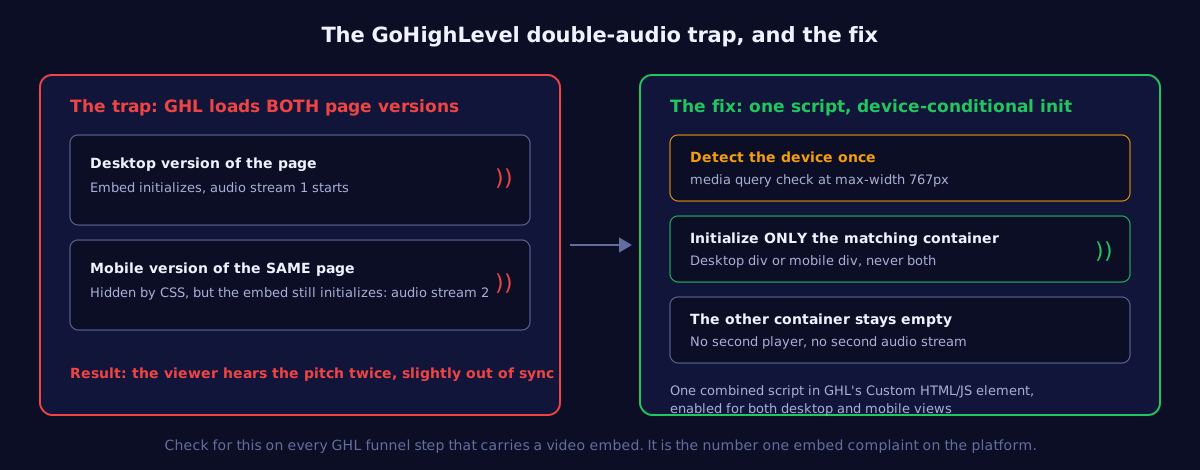
The fix pattern, documented in player embed guides for GHL and equally applicable to any player: create two empty containers (one desktop, one mobile), run a single script that checks the viewport with a media query at the 767px breakpoint, and initialize the embed only inside the container that matches. The other container stays empty, so there is no second player to make noise. One script, added once, enabled for both views.
On GoHighLevel, the question is never "did my video embed work?" It is "how many times did it work?" The right answer is exactly once.
How do you embed a custom player in a GHL funnel?
Add the Custom HTML/JS element to the section where the video belongs, paste the device-aware embed (two containers, one media-query check, conditional init), keep event names consistent with what your ad account already learns from, and preview on desktop plus a real phone before traffic. Total time: about ten minutes.
- Place the element where the video renders. The embed appears inline where the element sits, so put it in the hero section, full width, above the fold.
- Paste the device-aware snippet. If your player vendor provides a GHL-specific embed, use it. If not, wrap their standard embed in the two-container pattern above rather than pasting it twice.
- Wire the events. Watch milestones, CTA-reached, and purchase events with the same names as before, forwarded server-side so browser tracking loss does not starve the algorithm. The mechanics are in the server-side pixel forwarding guide.
- Listen before you launch. Preview the live URL on desktop and on an actual phone. Play the video. If you hear an echo, the device check is not running; fix it before a single click of paid traffic lands.
Two GHL-specific notes. First, keep the funnel step clean: one column, one video, one button, and gate decisions per the play gates framework: agencies running booking funnels usually gate at the calendar step, not mid-video. Second, remember GHL pages often live on client subdomains: confirm the player's domain settings allow the funnel domain, or the embed loads blank and you will blame the wrong tool.
Same page discipline as any builder applies here too. More than half of cold traffic meets the funnel on a phone, so check that the mobile view renders the player full width rather than letterboxed inside a padded column, and that the headline above the video restates the hook instead of introducing a second idea. The page is a frame; the video is the pitch.
How do agencies handle VSL embeds across client subaccounts?
Treat the embed like any other snapshot asset, with two rules: the device-aware snippet travels inside the snapshot so clones inherit the fix, and per-client tracking IDs get swapped at deployment so client A's watch data never lands in client B's pixel. A five-line deployment checklist per subaccount beats debugging attribution later.
The failure mode worth naming: an agency builds one beautiful VSL funnel, snapshots it, and deploys it to eleven subaccounts with the original account's player ID and pixel wiring still inside. Everything looks fine on the page, and every event reports to the wrong place. When you clone, re-point three things per client: the player or video ID, the pixel and CAPI destination, and the booking calendar. Then run the same listen-for-echo test on the client's live domain, because multi-client VSL tracking only works when each funnel reports to its own account.
What should you check before sending traffic?
Five checks: no double audio on the live URL, muted-start experience works (captions carry the hook, per browser autoplay rules GHL's docs also flag), mobile layout at real widths, pixel and event fires verified, and the funnel step stripped to one job. Ten minutes that protect the whole media budget.
The double-audio check comes first because it is the one that silently returns. Every time a funnel gets duplicated for a new client or a new offer, the embed comes along, and if someone rebuilds the mobile view by hand, the naive double-paste sneaks back in. Make "play the live page and listen" part of every funnel clone checklist, and check the retention curve after launch: a healthy page shows one clean session per viewer, while a double-load shows inflated starts with a heatmap that looks like nobody survives second one.
One embed, one audio stream, full visibility
VSLStats drops into GoHighLevel's Custom HTML/JS element with retention curves, play gates, and server-side pixels behind every funnel. Try any plan for $1.
Start $1 Trial →