How to Embed a VSL in ClickFunnels (The Right Way)
ClickFunnels will happily put a video on your page in thirty seconds. That is exactly the problem. The default path (drop the video element, paste a link, publish) produces a page that plays a video, and a video sales letter is not a video that plays. It is a sales asset that needs to report back: who watched, how deep, where they left, and which viewers turned into revenue.
This is the clean version of the setup: when the native element is fine, when it is quietly costing you money, the exact embed steps for ClickFunnels 2.0 and Classic, and the checklist that runs before a single paid click hits the page.
To embed a VSL in ClickFunnels 2.0, add an HTML/JS element (Section, Row, plus button, MISC category), open its Code Editor, and paste your player's embed snippet with JavaScript inside script tags. Classic uses the Custom JS/HTML element the same way. Use the native video element for casual video; use a direct-response player when the video's job is revenue.
What are your options for putting a VSL on a ClickFunnels page?
Two paths: the native video element (fastest, fine for demos and thank-you pages) or a custom player embedded through the HTML/JS element (direct-response features: retention analytics, play gates, timed CTAs, server-side tracking). The decision is not about the page; it is about whether you need to see and act on watch behavior.
| Need | Native video element | Custom player embed |
|---|---|---|
| Speed to publish | Fastest | Five extra minutes |
| Second-by-second retention | No | Yes |
| Play gates and timed CTAs | No | Yes |
| Server-side pixel forwarding | No | Yes (player-dependent) |
| Revenue attribution per viewer | No | Yes (player-dependent) |
The honest rule: if the video is decoration, the native element wins on simplicity. If the video is the salesperson, embed a player that can tell you the four numbers that matter on a VSL launch.
Why not just use the native video element for a real VSL?
Because you cannot fix what you cannot see. The native element plays video; it does not give you a retention curve, a pitch-cliff timestamp, gate analytics, or a purchase event tied to watch depth. Running paid traffic to a VSL without those is buying data and throwing it away.
This is not a knock on ClickFunnels. Page building is their job and they are good at it. But a VSL funnel makes its money in the gap between "the page loaded" and "the buyer clicked," and everything in that gap happens inside the player. When the hook bleeds viewers at second 20, the page editor will never tell you. When half your remaining audience leaves at the price reveal, only the player knows the timestamp. The same logic applies to YouTube embeds, with the added tax of related-video distractions pulling people off your pitch entirely.
The funnel builder owns the page. The player owns the proof. Confuse the two and you will optimize headlines while the video quietly loses the sale.
How do you embed a custom player in ClickFunnels 2.0?
Per ClickFunnels' own docs: insert a Section, add a Row, click the plus button, and choose HTML/JS from the MISC category. Open the Code Editor and paste the player's embed snippet. Keep JavaScript inside script tags, never add html or body tags, and note that ClickFunnels support does not troubleshoot custom code, so test on a draft page.
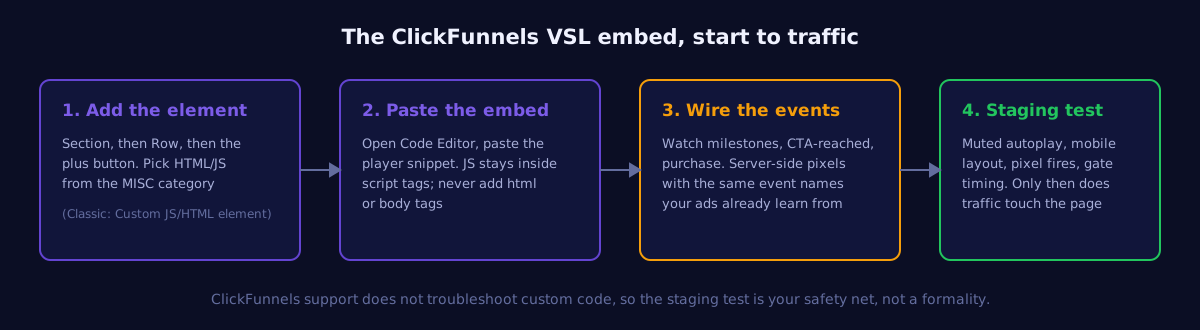
A few practical notes from doing this on real funnels. First, place the element where the video should render, not at the bottom of the page: the embed renders inline where the element sits. Second, most modern player snippets are fully self-contained, so they need nothing extra from the page. Third, per the HTML/JS element docs, custom code is on you: if the page misbehaves, strip the element back to the bare embed snippet and add customizations one at a time until you find the culprit.
And in ClickFunnels Classic?
Same idea, older skin: add the Custom JS/HTML element to the row where the video belongs and paste the embed snippet there. Classic pages tend to carry more legacy scripts, so the staging test matters even more: one funnel's ancient popup script can fight your player for the same event names.
What does a good ClickFunnels VSL page look like around the video?
One column, one video, one button. Headline above the player restating the hook's promise, the embed above the fold at full row width, the CTA below it (delayed if your traffic is cold), and nothing else: no nav bar, no footer maze, no secondary offers. The page is a frame; the video is the pitch.
ClickFunnels makes it easy to keep adding sections, and every one of them is a place for a cold visitor to wander instead of watching. The discipline that pays: strip the header navigation on the VSL step, keep testimonials below the CTA rather than above the video, and resist the second button. If the offer needs more explanation than the video gives, that is a script problem to fix in the video, not a layout problem to fix with more page.
Set the row to full width on mobile and check that the player does not render letterboxed inside a padded column. More than half of cold paid traffic will meet your VSL on a phone, and a video that loads small under a fat headline loses the hook before it plays.
What should you check before sending traffic?
Five things on a staging page: muted autoplay behavior (every browser forces muted starts, so captions carry your hook), mobile layout at real device widths, pixel and event fires verified in the platform, gate timing if you use one, and page speed with the embed in place. Ten minutes of checking protects the whole media budget.
- Muted-start reality. Browsers require autoplaying video to start muted. Watch your own page cold: does the first 10 seconds work with no sound? If the hook depends on audio, your captions are not optional.
- Event continuity. Watch milestones, CTA-reached, and purchase events should use the names your ad account already knows, forwarded server-side so browser tracking loss does not starve the algorithm. The mechanics live in the server-side pixel forwarding guide.
- Gate placement. If the funnel gates the video, place it after value, never before the hook: the full framework is in the play gates decision guide.
- The one-page rule. A VSL page has one job. Strip nav links, extra sections, and anything that gives a cold visitor an exit that is not the CTA.
- Speed sanity. Test load time before and after the embed. If the page got meaningfully slower, the usual suspects are oversized images and stacked tracking scripts, not the player.
If you are still picking the player itself, the operator-tested rankings live in the best VSL hosting for ClickFunnels.
Give your ClickFunnels VSL a memory
VSLStats embeds in the HTML/JS element in one snippet: retention curves, play gates, server-side pixels, and revenue attribution on any plan. Try any plan for $1.
Start $1 Trial →