Switching from Vidalytics to VSLStats: What to Expect
Nobody switches video hosts for fun. You switch because something specific is costing you money: conversions your pixel never saw, gate features behind a tier you resent paying for, attribution that stops at "somebody watched something." And the moment you decide to move, a new fear shows up: what breaks mid-flight while real ad spend is running against these funnels?
Here is the honest shape of it. A VSL player migration is an afternoon of mechanical work wrapped in two genuine risks, and neither one is the video files. The risks are tracking continuity and mid-flight experiments. Handle those two deliberately and the rest is embed-code housekeeping. This guide is the runbook I would hand a friend: what moves, what stays behind, the order of operations, and the specific mistakes that turn a clean switch into a quarter-ruining one.
Switching from Vidalytics to VSLStats means re-uploading your master videos, swapping embed codes, and rebuilding player-level features like gates and delayed CTAs. Your analytics history stays behind, so archive it first. The two real risks are conversion-event continuity (keep the same event names) and cutting over a funnel mid-experiment. Migrate one funnel at a time, lowest-risk first, with a verification week per funnel.
What actually moves when you switch VSL players?
Three things transfer cleanly: your video files, your page layouts (only the embed snippet changes), and your script knowledge, meaning the gate timestamps and CTA timings your old retention data already proved. Everything player-level rebuilds: gates, delayed CTAs, autoplay behavior, pixel wiring. Your historical analytics do not come along.
| Asset | Transfers? | How |
|---|---|---|
| Video files | Yes | Re-upload your masters (or download from Vidalytics) |
| Landing pages | Yes | Swap one embed snippet per page |
| Gate and CTA timestamps | Yes, as knowledge | Map them from old retention data, rebuild on the new player |
| Pixel and CAPI wiring | Reconfigure | Same event names, new sender |
| Analytics history | No | Archive reports before you cancel |
| Running A/B tests | No | Conclude or restart them; never migrate mid-test |
The one-line mental model: you are moving the projector, not the movie. The argument your VSL makes, the timestamps where it asks, the pages it lives on: all of that is yours and portable. What you leave behind is the old projector's logbook.
What do you lose when you leave Vidalytics?
Three things, honestly stated: your historical analytics continuity (per-video stats export as CSV or Excel exists per Vidalytics' help docs, but retention baselines restart on the new player), any interactive Smart Vids builds if you used them, and your accumulated player settings. None of them stops a migration; all of them reward a week of preparation before you cancel.
The history is the one that stings if you skip preparation. Your Vidalytics dashboards hold the baselines that make your new numbers meaningful: retention shapes, drop-off timestamps, play behavior by traffic source. Vidalytics documents downloading your videos from each video's settings page; do that if you lack masters, but spend the extra hour archiving reports too. Screenshot the retention curves. Export whatever tables offer a CSV. Write down the timestamp of every gate, CTA reveal, and drop-off cliff. That last list is literally your rebuild spec.
Fairness requires the flip side: if your funnel leans on Vidalytics features you genuinely use, weigh them before moving. Their interactive video product is real and has no exact equivalent here. What you gain in the trade is the tracking stack: server-side pixel forwarding, watch-depth revenue attribution, and gate analytics on every plan rather than the upper tiers. Our head-to-head comparison and the tier-by-tier pricing breakdown cover that math; this guide assumes you have done it.
What does the migration look like step by step?
Four phases: audit (inventory funnels, archive reports, gather masters, map timestamps), parallel build (upload and rebuild on VSLStats while Vidalytics keeps serving), cutover (swap embeds one funnel at a time, lowest-risk first), and verify (a week of watching events, revenue, and retention shape before decommissioning). One funnel at a time, start to finish.
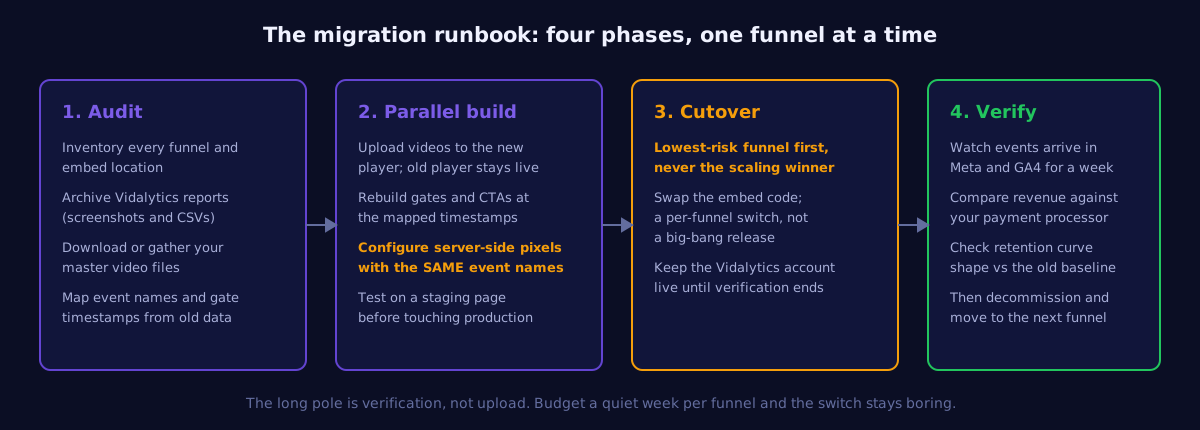
Two rules inside that sequence do most of the protective work. First, the parallel run: your Vidalytics account stays live and serving until the last funnel has passed verification. Paying both platforms for a month is the cheapest insurance you will ever buy against a broken launch. Second, cutover order: start with the funnel where a bad week costs the least, not the scaling winner you are most excited to move. The first funnel is where you discover the quirks; discover them somewhere cheap.
How do you protect your tracking during the cutover?
Event continuity is the whole game: the new player must fire conversion events with the same names and consistent deduplication as the old setup, so Meta and Google see a sender change, not a data reset. Rename events mid-flight and the algorithm relearns from scratch, which shows up as a spend-efficiency dip that gets blamed on the player.
Migrations do not fail on upload day. They fail two weeks later, in an ad account that quietly stopped learning because the events changed names.
The checklist is short but unforgiving. Keep event names identical. Keep your deduplication keys consistent so a purchase reported by both browser and server counts once, not twice; the mechanics are covered in the server-side pixel forwarding guide. Verify against your payment processor, not the pixel, because the pixel was already lying to you; that discrepancy is why your Meta pixel undercounts VSL conversions and probably part of why you are switching at all. And during the verification week, compare the retention curve shape on the new player against your archived baseline: the shape should match within noise. If it does not, suspect a player setting (autoplay, captions, gate position) before you suspect the audience.
When should you NOT switch?
Three situations: mid-scale on a winning campaign (finish the run first; never move the money printer while it is printing), an active A/B test you are not willing to restart, and a funnel that genuinely depends on a Vidalytics-only feature. Migration is a project with a payoff, not an emergency; schedule it like one.
The scaling case deserves the extra sentence. When a campaign is in Meta's good graces and spending profitably, everything about it is fragile state: the learning, the audience, the creative fatigue curve. Adding a player swap to that stack of variables is how operators create mysteries they spend a month solving. Cut over the quiet funnels first, let the winner finish its run, then move it during the natural pause between campaigns.
How long does a Vidalytics migration take?
For a single funnel: an afternoon of build, a week of verification. For a portfolio, plan per-funnel batches on the same rhythm rather than one big-bang weekend. The calendar time is dominated by verification patience, not by work, and that patience is exactly what makes the switch uneventful.
A realistic single-funnel sequence looks like this:
- Day 1: archive Vidalytics reports, gather masters, write the timestamp map, upload to VSLStats, rebuild gates and CTAs, wire pixels with matching event names, test on a staging page.
- Day 2: swap the production embed during a low-traffic hour. Watch the first hundred sessions arrive: events firing, retention drawing, revenue attributing.
- Days 3 to 9: the verification week. Compare event counts against the processor daily. Check the curve shape against baseline. Touch nothing else on that funnel so the comparison stays clean.
- Day 10: mark the funnel done, move to the next. Cancel the old account only when the last funnel clears.
If you run the whole thing on the $1 trial, the evaluation costs you a dollar and a quiet week. That is the entire downside of finding out.
Run the parallel test
Put one funnel on VSLStats next to your Vidalytics setup and compare the tracking side by side: server-side pixels, watch-depth attribution, gate analytics. Try any plan for $1.
Start $1 Trial →